
Sync not available
-
-
Hello @kleung Thank you for reaching out! Could you verify that...
- You are signed in on both devices with the same account (and used QR code login for one of them).
- Space you are trying to sync is a Synced Space. You can either create a new Synced Space or go to Settings > Sync > Activate Sync
-
-
-
@kleung That seems to be buggy behavior, will look into improving this.
Can you try the following instead:
- On your device where you haven't logged in, click "Create Account". Afterwards, instead of creating an account, login with same account you have on your main device.
- After logging in, you will see this, click Enter Recovery Key
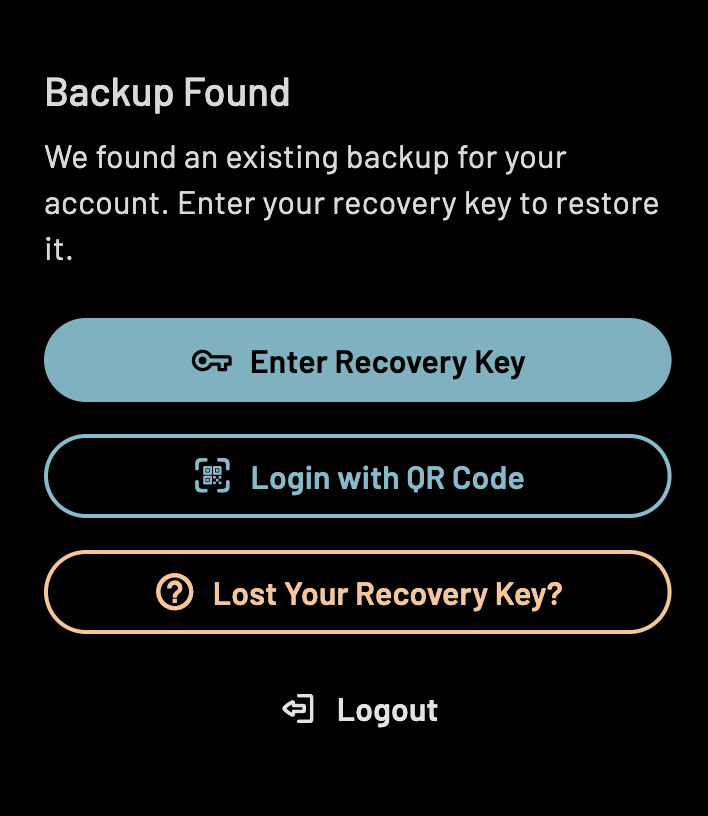
- Now, on your main device, go to Settings > Sync Settings > Recovery Key and to find the recovery key. Type it in manually in the other device.
This should let you pair your devices. If not all content appears after a few minutes, click "Force Sync" in the second devices' settings.
Sorry for the inconvenience, this system is very new and complex because of the encryption involved. There are some updates coming to address this.
-
-
-
 G gagik moved this topic from Bug Reports on
Hello! It looks like you're interested in this conversation, but you don't have an account yet.
Getting fed up of having to scroll through the same posts each visit? When you register for an account, you'll always come back to exactly where you were before, and choose to be notified of new replies (either via email, or push notification). You'll also be able to save bookmarks and upvote posts to show your appreciation to other community members.
With your input, this post could be even better 💗
Register Login