
Task reminders by typing the time in text
-
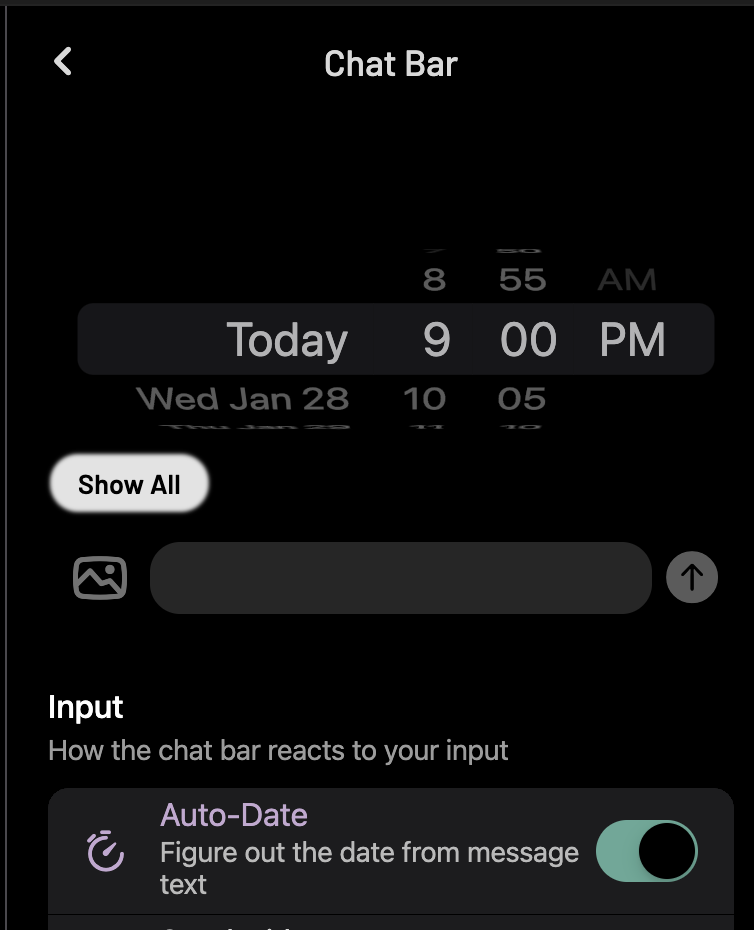
Hi, I’m new to the app and absolutely loving it. Until yesterday, I think I was able to set reminders by texting, for example: “Remind me to finish xyz task by 10pm today” and after I hit Enter, that 10pm would get underlined and it would take that as the reminder time. I didn’t use the time wheel to set the time to 10pm or anything. But now when I do that, it is not reading the time I type in the text - instead, it is actually only reading the wheel time “tomorrow 9am” every single time! Is this a bug? Or is it some setting issue?
-
-

Hello! It looks like you're interested in this conversation, but you don't have an account yet.
Getting fed up of having to scroll through the same posts each visit? When you register for an account, you'll always come back to exactly where you were before, and choose to be notified of new replies (either via email, or push notification). You'll also be able to save bookmarks and upvote posts to show your appreciation to other community members.
With your input, this post could be even better 💗
Register Login